Extension for Chrome and Gmail
Your CRM, right inside Gmail.Your deals, stages and contacts next to your email.Backed by your own Notion.
See deals, stages and contacts right next to your email. Move a deal, write a note or reply with a template without leaving your inbox. Everything is saved in your own Notion databases.
From $19 per user and month. Well below the big Gmail CRMs.

Why Strezia Sync
A CRM only helps if you actually use it.
Most CRMs ask you to leave your inbox, log in somewhere else and keep a second system up to date. So the team stops, and the data goes stale. Strezia Sync takes the opposite route.
A separate app behind another login. The data lives in the vendor's cloud, the team forgets to open it, and within a month it no longer matches reality.
The CRM sits inside Gmail, where you already spend the day, and every record is saved in your own Notion. You update a deal while you read the email, and the data stays yours for good.
Who it is for
Made for people who run the day from Gmail.
If you live in your inbox and keep your notes in Notion, Strezia Sync fits the way you already work. It is new, so instead of logos, here is who we built it for.
A real CRM, not just a viewer.
Pipelines, tasks, a timeline and saved views, all driven from Gmail and saved in your own Notion. Build it around the way you already work.
Custom and multiple pipelines
Point a pipeline at any Notion database, choose the stage field and which columns show. Add as many pipelines as you want. Sales, tenants, apartments, properties, staff and much more.
Flexible fields
Every Notion field type renders in Gmail: text, select, status, date, number, relation, multi-select, url, email and phone.
Tasks and reminders
Create tasks with due dates on any record. See what is overdue, due today and coming up. Saved in your own Notion.
Timeline, notes and call logs
A full history on every record. Add notes and log calls without leaving Gmail. Saved in your own Notion.
Saved views
Save named filter, sort and column setups, and switch between them in one click.
LinkedIn in one click
Open a contact’s LinkedIn profile, or a LinkedIn search, straight from the record.
Map
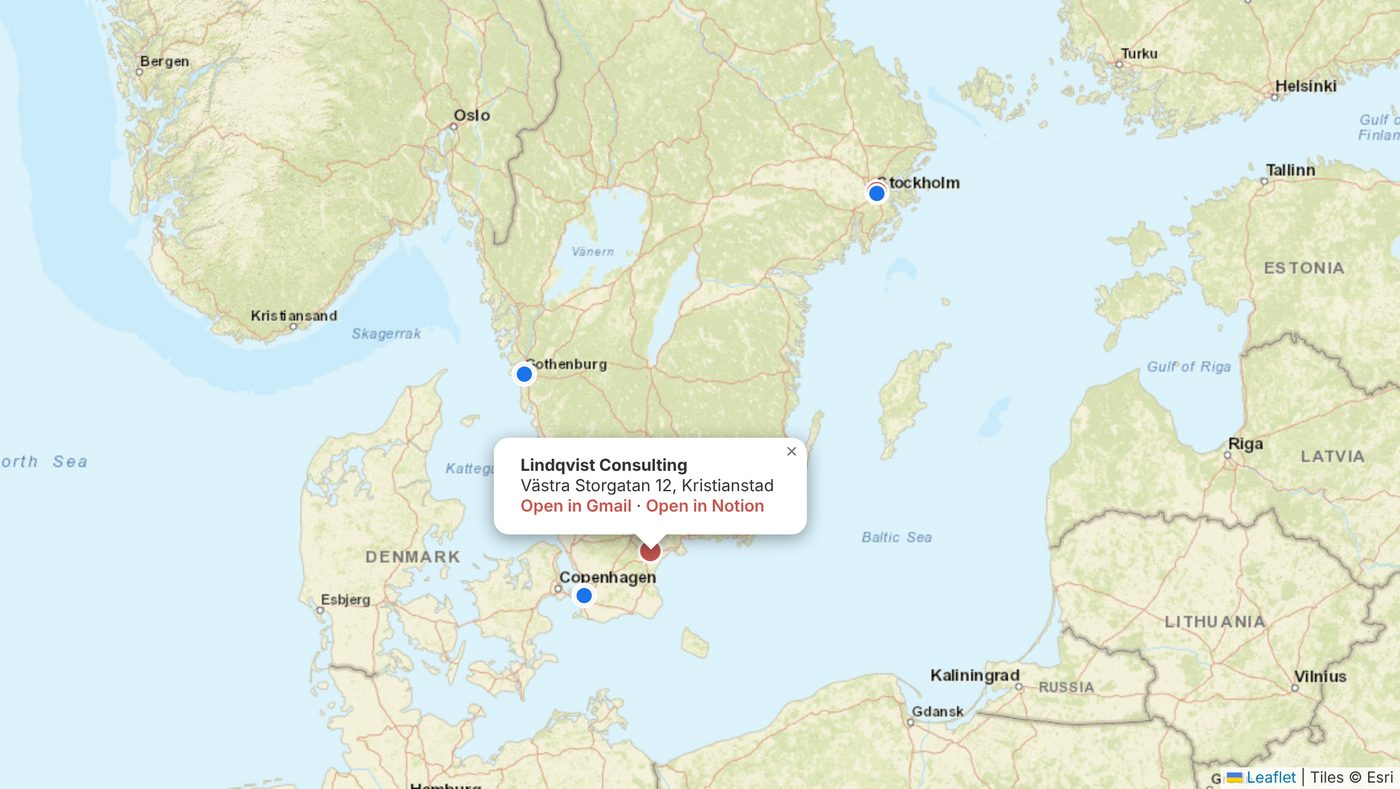
See your contacts and companies on a map, from the addresses in your Notion. Click a pin to open the record in Gmail or Notion.
Everything in one place
Everything in Strezia Sync.
CRM in Gmail
Deals, stages and contacts show next to your email, without leaving your inbox.
Stage bar and pipeline
Move the deal a stage straight from the email, or drag it between stages on the board.
Status in the mail list
Every thread gets its deal and stage as a colored label in the list.
Email templates
Reply with the right template in seconds. You always press Send yourself.
Follow-ups
Dates and next steps that show what is overdue, today and this week.
Open tracking
See when the recipient opens your email and how many times. You choose.
Pixel protection
Blocks others’ tracking pixels in emails you receive, so the sender cannot see when you open.
The whole thread follows
New replies in a saved thread attach to the deal automatically.
Contacts from the signature
Name, title and phone are read from the email and added as a contact.
On mobile too
The deal and contact also show in the Gmail app on your phone.
Notion as backend
All data in your own Notion databases. You own it and can use it anywhere.
The reports are built in.
Pick a period and Strezia Sync shows your pipeline funnel, open deals by type, email activity and the amount you have won. All from the data in your own Notion.
Right in your email
The deal shows above every email.
When you open an email, a row at the top shows who the sender is in your CRM: contact or company, with the deal stage. Expand the row to see the details, move the deal with one click on the stage bar, and change value, expected close, next step and note right there. Everything saves straight to Notion.
- Color-coded stage bar for every open deal
- Fields that save straight to Notion
- Dashed gray row when the sender is new, with an Add to CRM button
Status in your inbox
See what every email is about before you open it.
The mail list shows at a glance what each thread is. A deal gets a label in its stage color, for example Quote or Negotiation. Click the label to open the record in Notion. In the CRM view you switch between table and board and drag deals between stages.
Templates
Reply with the right template in seconds.
Templates live in their own Notion database and show up grouped as you write. Name, company and deal are filled in automatically. You read it through and press Send yourself. Nothing goes out on its own.
Follow-ups
Never forget to follow up.
Set a follow-up date and a next step on the contact or deal. The CRM shows what is overdue, what is due today and what is coming up this week, both in Gmail and in Notion.
- Next step and date on every contact and deal
- Days since last contact
- List and calendar of this week’s follow-ups
New
See when your email is opened. And avoid being tracked yourself.
Both are included in Strezia Sync. You choose whether open tracking is on, and can turn it off for individual emails.
Open tracking
IncludedWhen the recipient opens the email you see it on the deal and contact in Notion: when it was opened and how many times. Perfect for knowing when the quote has been read and it is time to call.
Turn on or off in settings
Off by default. You choose whether the feature is active, and can then turn it off for individual emails.
Pixel protection
IncludedMany newsletters and sales tools hide an invisible image in the email to see when you read it. Strezia Sync recognizes these tracking pixels and stops them, so the sender never learns when or where you open.
Works in the background across your whole inbox.
No lock-in
Your data. Your Notion. Always.
Most CRMs keep your customers on their servers, so leaving means a migration. Strezia Sync is the other way around. The CRM is just your own Notion, and the extension reads and writes it in place.
It is yours
Deals, contacts and companies live in Notion databases on your own account. You can open, edit or share them without us.
Leave whenever you want
Because it is standard Notion, you can export to CSV or simply keep working in Notion. There is nothing to migrate out of.
Nothing on our servers
Strezia Sync talks to your Notion and to Gmail directly. We do not copy your CRM into a database of our own.
Strezia Sync vs the others.
The same CRM in Gmail as the big players, but with your data in your own Notion and pixel protection. At a fraction of the price.
| Feature | Strezia Sync | Streak | Pipedrive | Copper |
|---|---|---|---|---|
| Lives right in Gmail | ✓ | ✓ | Partial | ✓ |
| Your data in your own Notion | ✓ | ✗ | ✗ | ✗ |
| Open tracking | ✓ | ✓ | ✓ | ✓ |
| Pixel protection from others’ tracking | ✓ | ✗ | ✗ | ✗ |
| Email templates | ✓ | ✓ | ✓ | ✓ |
| Swedish tool and support | ✓ | ✗ | ✗ | ✗ |
| Price per user and month | $19 | from $49 | from $19 | from $21 |
Competitor prices per the vendors’ price lists in October 2026 and may change. Names belong to their respective owners. Strezia Sync is not affiliated with them.
Map
Your contacts and companies on a map.
Every address in your Notion becomes a pin. Red for companies, blue for people. Click one to open the record in Gmail or Notion.
Get started
Up and running in four steps.
The Notion template is free. Add the extension, connect your Notion, and your CRM shows up inside Gmail.
Install Strezia Sync
Add the extension to Chrome and start your 10-day trial. Nothing is charged until it ends.
Duplicate the Notion template
Click the button below to copy the CRM into your own Notion workspace. It comes with Deals, Companies, Contacts and email templates.
Connect Notion
Open the extension settings and click Connect Notion. It finds your three databases automatically. You can also paste a Notion integration key and the database ids by hand.
Open Gmail
Click the Strezia flower in Gmail's left sidebar. Your pipeline, companies and contacts sit right next to your email.
Simple pricing. Everything included.
Prices excluding VAT. Comparable Gmail CRMs cost from around $49 per user and month, and more for the complete plans. Strezia Sync gives you the same in Gmail, with your data in your own Notion, at under half the price.
Every plan begins with a 10 day free trial, and during the trial you have a full right of withdrawal and pay nothing. When you choose monthly or yearly you commit to that full period, so once the trial turns into a paid subscription the current period cannot be cancelled.
Got a discount code? Enter it at checkout.
Try the CRM in your own Gmail
Works with Gmail and Notion. Get set up in minutes and start with a 10-day free trial, no charge until it ends.
Start 10-day trialBuilt by Strezia
A small team, and a real person behind support.
Strezia is a small software company in Kristianstad, Sweden. We build Strezia Sync ourselves and answer support ourselves. There is no call center and no upsell. When you email us, a person who knows the product replies.
We keep the tool simple, the price honest, and your data in your own Notion. That is the whole idea.
FAQ
Common questions
Do I need a Notion account?
Yes. The free Notion plan is enough. The template and all your data live in your own Notion workspace.
Where is my data stored?
In your own Notion. Strezia Sync reads and writes your databases directly. Nothing is stored on our servers.
Does it work in Outlook or Apple Mail?
Not yet. Strezia Sync runs in Gmail in Chrome for now.
Can I use my own pipeline and fields?
Yes. You own the databases in Notion. Rename stages, add fields, and the extension follows your setup.
Are emails sent automatically?
No. Strezia Sync opens a draft in Gmail. You read it through and press Send yourself. Nothing goes out on its own.
How do I cancel?
Anytime. During the 10-day trial you are not charged, and you can cancel from your account whenever you like.
Who owns my data?
You do. Everything lives in your own Notion, on your account. If you ever stop using Strezia Sync, your CRM stays in Notion exactly as it is.
Is my email content safe?
Strezia Sync runs in your browser and talks to your Notion and to Gmail directly. We do not store your emails, and the content is not sent to our servers.
How long does setup take?
A few minutes. Install the extension, duplicate the Notion template, connect Notion, and your CRM appears inside Gmail.
Can I use my existing Notion databases?
Yes. Point Strezia Sync at databases you already have. Choose which one is deals, companies and contacts, and which field is the stage. You do not have to use our template.
Have a question?
Write to us and we will get back to you. No automatic reply is sent.